BGears b-Pellucid MicroATX Mini Tower Case vs Zalman T6 ATX Mid Tower Case
Side-by-side pc case comparison with performance scores, spec-by-spec breakdown, and recommendations to help you pick the right part for your PC build.

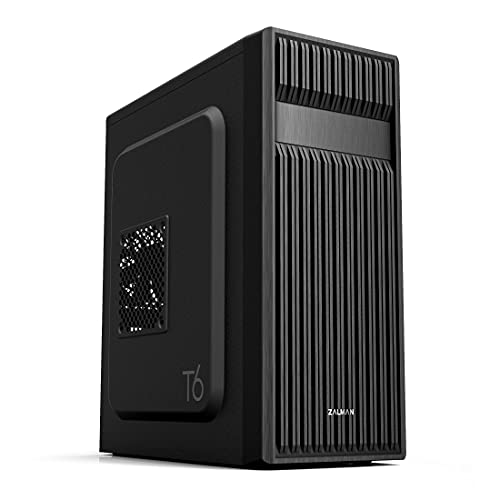
Key specs at a glance
Top 1 specs that matter most. Full spec-by-spec breakdown is in the table below.
Physical
| Component | ||
|---|---|---|
| Physical | ||
| Dimensions | 350 mm x 279 mm x 375 mm 13.78" x 10.984" x 14.764" | 377 mm x 200 mm x 430 mm 14.843" x 7.874" x 16.929" |
| Motherboard Support | Micro ATX Mini ITX | ATX Micro ATX Mini ITX |
| Case Type | MicroATX Mini Tower | ATX Mid Tower |
| Max GPU Length | 330 mm | 280 mm |
| Build | ||
| Side Panel | Tinted Tempered Glass | None |
| Color | Black | Black |
| Power Supply | None | None |
| PSU Shroud | Yes | No |
Common questions
How should I choose between these pc cases?v
Look at the Overall score in the summary above - it's a weighted blend of the specs that matter most for a pc case (performance, memory, power). Then cross-check the Value score, which divides that by price. Below the summary, the spec-by-spec breakdown shows exactly where each option leads or lags.
Can I mix any of these pc cases with the rest of my parts?v
PC Launchpad's Guided Builder checks compatibility across every component automatically. Click "Use in Build" on any option above and the builder will flag socket, form-factor, wattage, or clearance issues before you check out.
Where are the prices from?v
Prices come from Amazon availability, which PC Launchpad updates regularly. If a component is out of stock or prices change, the comparison may not reflect the latest number - always confirm on the retailer page before you buy.
Is the BGears b-Pellucid MicroATX Mini Tower Case better than the Zalman T6 ATX Mid Tower Case?v
It depends on the workload. Use the chart summary above for the quick read, then look at the spec-by-spec breakdown to see which individual metrics favor which part. Verifiable numeric winners are emphasized only when the data has a clear direction, such as higher capacity or lower latency.
Which one is better value - the BGears b-Pellucid MicroATX Mini Tower Case or the Zalman T6 ATX Mid Tower Case?v
The Value score in the summary divides the Overall performance score by current price, so the higher-scoring one is the stronger $/performance pick on today's prices. For budget builds, favor Value; for no-compromise builds, favor Overall.